You log on to your favorite game, and instead of the reels loading, a red banner appears, stating your location cannot be verified. Nothing about your day changed. You're sitting in the same living room you played from yesterday. Why does your screen display an incorrect location? If you've been wondering how to fix social casino geolocation errors, you are not alone, as it is one of the most popular glitches that happens with online sweepstakes, and most of the time it takes less than 5 minutes to resolve.
What a Location Error Means
Sweepstakes sites do not accept any claims regarding your sitting position. These sites require you to take a location check before logging on and during the session, and it is only if you pass that check that you can participate. This check fetches information from your device, GPS, data from the Wi-Fi network, your IP address, and cell tower data in the case of mobile devices, and compares it to a list of approved areas.
If they don't agree, or if none of them can be read clearly, then it throws an error; it doesn't guess. That is the whole reason for most of the location errors: Not a ban, not a flag on your account, just a system that'd rather ask twice than get it wrong once.
Signs You're Dealing With a Location Glitch
It is wise to identify the problem you have in front of you. A true case of geolocation errors manifests itself through:
- A notification that has words like "location," "region," or "geolocation" in place of issues like logins or passwords
- Loading of games but inability to purchase or redeem coins
- When it occurs just on some networks, such as an office Wi-Fi but not a home Wi-Fi network
- If the error is sorted when you move from using a Wi-Fi connection to mobile data
- The error returns every time you reopen the app, even after a fix that worked briefly
When this is the case, then you’re definitely dealing with some sort of technological problem rather than a limitation with your account, and the two are vastly different issues when it comes to how you would go about resolving the problem.
Why the Verification Step Protects You
It's easy to see a location check as an obstacle. In practice, it's doing a few things that work in your favor:
- It confirms you're in a region where sweepstakes entry and prize redemption are actually permitted, so you're not left with coins you can never cash out
- It protects your account from being accessed or claimed by someone using your login from an unrelated location
- It's a required step for sweepstakes identity verification, which is what allows Sweeps Coins to eventually be converted into a prize in the first place.
Skipping or spoofing this step doesn't just risk an error message; it can put your account, and any coins sitting in it, in jeopardy.
Who's Actually Eligible to Play
Not every region participates, and this is where a chunk of "how to fix social casino geolocation errors" aren't errors at all; they're the system working correctly. At Bitsky, for example, participation requires that you:
- Must be at least 18 years old (21 in some states)
- Must be physically present in a qualified U.S. state when you participate
- Must not be physically present in California, Connecticut, Delaware, Idaho, Illinois, Indiana, Louisiana, Maine, Michigan, Montana, Nevada, New York, Tennessee, or Washington
California and New York access has been disabled as of December 24, 2025, so if you are trying to log in from those states, there is no fixing this problem; this one is on legal grounds, not technical. Every sweepstakes site will have its own list; it’s always a good idea to check the latest eligibility requirements first.
How Location Verification Works Behind the Scenes
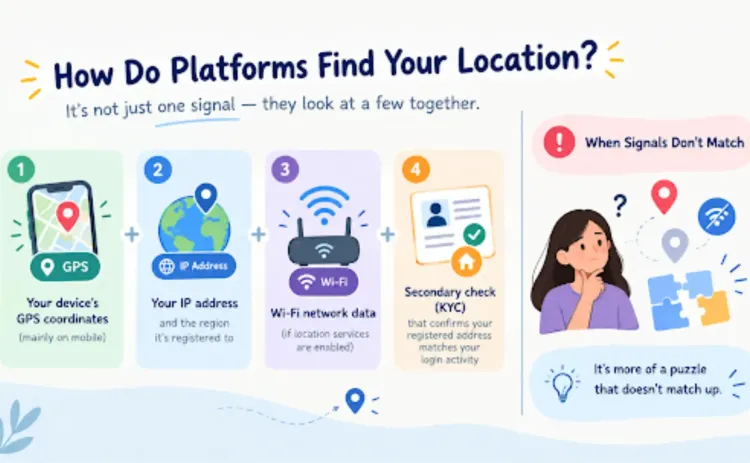
Platforms tend not to use one signal. Instead, they layer a few together:
- Your device's GPS coordinates (on mobile, primarily)
- Your IP address and the region it's registered to
- Wi-Fi network data, if location services are enabled
- Sometimes, a secondary check during account verification (KYC) that confirms your registered address lines up with your login activity
But if these conflict, for example, if your IP indicates one location but your GPS is not even turned on at all, then the system cannot be sure of who you are, hence the message. It is more of "the puzzle does not match up" than "you have done something wrong."
Fixing It Fast: The Steps That Actually Work
Here's the order most support teams recommend when it comes to how to fix social casino geolocation issues.
Below is the sequence recommended by many support groups, starting with those that will solve the problem for most people:
- Turn off any VPN, proxy, or IP-masking tool. This is the single biggest cause of location errors, and it's also against most platforms' terms of use, so this step alone resolves a large share of cases.
- Make sure that location settings are enabled on your browser or application rather than the device, as this can be turned off more frequently than most people think.
- Close and reopen the application or browser window/tab. This is probably an issue caused by a location cache problem that needs to be cleared by a reboot.
- Switch networks. If you're connected to wifi, try using mobile data for a while, or the opposite. In particular, public and office networks often return wrong IP-based information.
- Try clearing your browser's cache and cookies or updating the application to its latest version if you are using a mobile device.
- Double-check you're actually in an eligible state. It sounds obvious, but travel across a state line is a frequent, overlooked cause.
- Reach out to support if none of the above work; a persistent error after these steps usually means something needs a manual look on the platform's end, not yours.
What Legal Limits Mean for You
There's an important line here worth being direct about: troubleshooting can fix a technical error, but it cannot and should not be used to get around a state restriction. Using a VPN to make it seem like you're from a qualifying state when you aren't is not an acceptable solution but a violation of the terms on the platform, which could result in the suspension of your account as well as the loss of all your coins and pending bonuses. If you are from a non-qualifying state, the honest response is that the platform doesn't qualify for you.
What Happens Once It's Resolved
Once your location clears, everything picks back up right where it left off: your coin balance, your login streak, and any pending KYC status. This is also the point where new players often complete verification for the first time. On Bitsky, that process comes with its own set of rewards:
- A welcome bonus of 10,000 Gold Coins plus 1 Sweeps Coin just for signing up
- An additional 10,000 gold coins plus 2 Sweeps Coins once you complete identity verification (KYC)
If you're topping up your coin balance around the same time, it's also worth knowing that Bitsky is currently running a 20% bonus on the 0.20 SC and 20,000 Gold Coin package when you use the code BONUS4U at checkout, a detail easy to miss if you're focused on getting the location error sorted first.
Sweepstakes Platforms vs. Traditional Real-Money Sites
It helps to understand why this verification process even exists in the first place, and that comes down to how sweepstakes-style platforms are structured compared to traditional real-money sites.
Traditional real-money systems have to meet the requirements of state-by-state licensing, which implies that the company should be authorized separately in each of the states in which it operates. The Sweepstakes platform functions in another way because it doesn’t require any payment in order to participate and win. Sweeps Coins, which can eventually be exchanged for a prize, are earned through free promotional methods rather than purchased outright. Because this model runs on a promotional entry system rather than state licensing, location verification becomes the primary tool for confirming eligibility; it's doing the job that a license application would otherwise do. That's precisely why the check feels more front-and-center on a sweepstakes platform than it might on other types of sites.
A Quick, Real Example
Picture a player who signs in every morning from home, then again from a coffee shop during lunch. On the coffee shop's guest Wi-Fi, the platform suddenly can't confirm her location because the network's IP address is registered to a business ISP account three states away from her actual location. There is nothing wrong with what she is doing; it is the network that is providing wrong information. She switches to using mobile internet, and within minutes, she manages to log into the website with no problems at all. By the time she gets back home in the evening, logging in using her home Wi-Fi is smooth again.
Conclusion
The problem of how to fix social casino geolocation errors can be linked to some minor mistake, such as forgetting to log in to a VPN, using a Wi-Fi connection whose IP address is not registered with the right location settings, or just changing the location setting without noticing while doing the update. Follow the steps above in sequence, and in most cases, the problem will solve itself after a few minutes. In case the problem is linked to eligibility in the state where you reside, there won't be any way to fix it. At least you would have the reason, not the guesswork.
Still Seeing a Geolocation Error?
If you're still wondering how to fix social casino geolocation problems on your own device. Don't let a location verification issue interrupt your gaming experience. Check your GPS, Wi-Fi, and location settings, then try logging in again.
FAQs
Does a location error mean my account has been banned or flagged?
No. The geolocation error is related to verification, not sanctions. Nothing happens to your account; all your coins, progress, and history stay just the way they were when the geolocation process completes.
Can I use a VPN to get around a state restriction?
This is not advised and generally violates the terms of the website. Apart from being at the risk of having your account suspended, it also makes the entire process of verification pointless, since you have already proven yourself ineligible.
Why does the error keep happening even though I'm definitely in an eligible state?
It is generally a problem with the network as opposed to an issue with your eligibility; some of the common culprits include using public Wi-Fi networks, having outdated router firmware, or having a VPN application running in the background.
Does switching from Wi-Fi to mobile data actually make a difference?
Indeed, more than most would assume. The Wi-Fi connection goes through an internet service provider that uses another regional IP address that might not correspond with your current location, whereas mobile data is more accurate.
Will a geolocation error cause me to lose coins or rewards I've already earned?
No. Coins, streak progress, and reward claims will not be removed from your account. This error prevents you from engaging in new actions, such as purchases or reward claims, until your location can be confirmed.
How long should I wait before contacting support?
However, if you have tried all of the basic solutions, restarted the application, changed the network, and turned off the VPN, and the problem persists for approximately ten minutes, then it may be an appropriate time to contact someone.
Authored and Validated By: A Sweepstakes Gaming Expert